> For the complete documentation index, see [llms.txt](https://overleaf-pro.ayaka.space/llms.txt). Markdown versions of documentation pages are available by appending `.md` to page URLs; this page is available as [Markdown](https://overleaf-pro.ayaka.space/home/es/home.md).

# Inicio

<h3 align="center"><mark style="color:morado;">\begin</mark> <mark style="color:$info;"><strong>{</strong></mark> <mark style="color:$primary;">Documentos</mark> <mark style="color:$info;"><strong>}</strong></mark></h3>

<h2 align="center">Edición Pro de Overleaf</h2>

<p align="center"><mark style="color:$info;">Edición Comunitaria de Overleaf mejorada con todas las funciones Pro</mark><br><mark style="color:$info;">(código abierto, de uso gratuito, autoalojable).</mark></p>

<p align="center">Escribe como un científico de cohetes con Overleaf Pro<br>— <em><mark style="color:verde;"><strong>desbloquea todas las funciones</strong></mark></em>, un <em>local</em> solución que <em>cualquiera</em> puede usar.</p>

<p align="center"><a href="/spaces/yLFrF2L1FakWXkhqpOnS/pages/W4THeswYLuFORUQh0ou0" class="button primary" data-icon="rocket-launch">Comenzar</a>   <a href="/spaces/yLFrF2L1FakWXkhqpOnS/pages/2c77b09820f297feda7d8f3e26f870c4f1ff7e82" class="button secondary" data-icon="book">Leer documentos</a></p>

<p align="center"></p>

<figure><img src="/files/dc89b2ffeae28336cab139134896fe42dd4a9fe8" alt=""><figcaption></figcaption></figure>

### Funciones

<table data-view="cards"><thead><tr><th></th><th></th><th></th><th data-hidden data-card-target data-type="content-ref"></th><th data-hidden data-card-cover data-type="image">Imagen de portada</th></tr></thead><tbody><tr><td><h4><i class="fa-clone">:clone:</i></h4></td><td><a href="/spaces/yLFrF2L1FakWXkhqpOnS/pages/BI1vIvH9Q0DHZ5hNXgEM#features-01-templates-system"><mark style="color:$primary;"><strong>Sistema de plantillas</strong></mark></a></td><td><mark style="color:$info;">Publica tu</mark>  <span class="math">\LaTeX</span> <mark style="color:$info;">plantilla a tus miembros.</mark></td><td></td><td data-object-fit="fill"><a href="/files/163437c308fe22264b45fe85e2048ed82ce68cf7">/files/163437c308fe22264b45fe85e2048ed82ce68cf7</a></td></tr><tr><td><h4><i class="fa-server">:server:</i> </h4></td><td><a href="/spaces/yLFrF2L1FakWXkhqpOnS/pages/BI1vIvH9Q0DHZ5hNXgEM#features-02-sandbox-compile"><mark style="color:$primary;"><strong>Compilación en sandbox</strong></mark></a></td><td><mark style="color:$info;">Compila tu proyecto en Docker con aislamiento y cualquier versión de TeX Live.</mark></td><td></td><td data-object-fit="contain"><a href="/files/1138ab40d881ae17d9d8905c734c1ddbbc682c44">/files/1138ab40d881ae17d9d8905c734c1ddbbc682c44</a></td></tr><tr><td><h4><i class="fa-git-alt">:git-alt:</i></h4></td><td><a href="/spaces/yLFrF2L1FakWXkhqpOnS/pages/BI1vIvH9Q0DHZ5hNXgEM#features-03-git-intergration"><mark style="color:$primary;"><strong>Integración con Git</strong></mark></a></td><td><mark style="color:$info;">Sincroniza tu proyecto con GitHub o GitLab.</mark></td><td></td><td data-object-fit="fill"><a href="/files/a4478367239720c6bfd0e3962094ba611c0aa8ea">/files/a4478367239720c6bfd0e3962094ba611c0aa8ea</a></td></tr><tr><td><h4><i class="fa-pi">:pi:</i></h4></td><td><a href="/spaces/yLFrF2L1FakWXkhqpOnS/pages/BI1vIvH9Q0DHZ5hNXgEM#features-04-symbol-palette"><mark style="color:$primary;"><strong>Símbolo</strong></mark> <mark style="color:$primary;"><strong>Paleta</strong></mark></a></td><td><mark style="color:$info;">Inserta tu símbolo de LaTeX de forma fácil y rápida.</mark></td><td></td><td><a href="/files/fcc32a9266c736258bca31bd66c159ed49d51d5a">/files/fcc32a9266c736258bca31bd66c159ed49d51d5a</a></td></tr><tr><td><h4><i class="fa-user">:user:</i> </h4></td><td><a href="/spaces/yLFrF2L1FakWXkhqpOnS/pages/BI1vIvH9Q0DHZ5hNXgEM#features-05-admin-panel"><mark style="color:$primary;"><strong>Gestión de usuarios</strong></mark></a></td><td><mark style="color:$info;">Gestiona tu equipo y usuarios con el panel de administración.</mark></td><td></td><td><a href="/files/5e78e4e402e046f15aca2c2eab29349270391922">/files/5e78e4e402e046f15aca2c2eab29349270391922</a></td></tr><tr><td><h4><i class="fa-message-pen">:message-pen:</i> </h4></td><td><a href="/spaces/yLFrF2L1FakWXkhqpOnS/pages/BI1vIvH9Q0DHZ5hNXgEM#features-06-review-panel"><mark style="color:$primary;"><strong>Panel de revisión</strong></mark></a></td><td><mark style="color:$info;">Habla con tu instructor y deja comentarios sobre tu tesis.</mark></td><td></td><td data-object-fit="fill"><a href="/files/85a1ff755cdeb732f41204d766d9574cecb2e201">/files/85a1ff755cdeb732f41204d766d9574cecb2e201</a></td></tr><tr><td><h4><i class="fa-user-key">:user-key:</i></h4></td><td><a href="/spaces/yLFrF2L1FakWXkhqpOnS/pages/BI1vIvH9Q0DHZ5hNXgEM#features-08-sso"><mark style="color:$primary;"><strong>Compatibilidad con SSO</strong></mark></a></td><td><mark style="color:$info;">Conéctate con un proveedor OAuth, SAML o LDAP.</mark></td><td></td><td data-object-fit="fill"><a href="/files/9329f5ed5653eee7bbfd49f401f3352fac86be2b">/files/9329f5ed5653eee7bbfd49f401f3352fac86be2b</a></td></tr><tr><td><h4><i class="fa-table-cells-rows">:table-cells-rows:</i></h4></td><td><a href="/spaces/yLFrF2L1FakWXkhqpOnS/pages/BI1vIvH9Q0DHZ5hNXgEM#features-10-self-registeration"><mark style="color:$primary;"><strong>Autoregistro</strong></mark></a></td><td><mark style="color:$info;">Regístrate rápidamente con correo electrónico y contraseña.</mark></td><td></td><td data-object-fit="contain"><a href="/files/1e4750d72d023631e45e82ef1cd2dbddb3d36a79">/files/1e4750d72d023631e45e82ef1cd2dbddb3d36a79</a></td></tr><tr><td><h4><i class="fa-server">:server:</i></h4></td><td><a href="/spaces/yLFrF2L1FakWXkhqpOnS/pages/BI1vIvH9Q0DHZ5hNXgEM#features-09-arm-supported"><mark style="color:$primary;"><strong>Compatible con ARM</strong></mark></a></td><td><mark style="color:$info;">Ejecuta tu Overleaf con un Mac mini o un servidor ARM.</mark></td><td></td><td data-object-fit="contain"><a href="/files/8b2eaa6f1007fa19c3c1900122ee1c966269aa1d">/files/8b2eaa6f1007fa19c3c1900122ee1c966269aa1d</a></td></tr><tr><td><h4><i class="fa-github">:github:</i></h4></td><td><mark style="color:$primary;"><strong>Sincronización bidireccional con GitHub</strong></mark></td><td><mark style="color:$info;">Próximamente.</mark></td><td></td><td data-object-fit="contain"><a href="/files/d620e55c6fe8c48848bb3127f6f3912f0814fb9a">/files/d620e55c6fe8c48848bb3127f6f3912f0814fb9a</a></td></tr></tbody></table>

{% columns %}
{% column width="50%" %}
{% embed url="<https://files.gitbook.com/v0/b/gitbook-x-prod.appspot.com/o/spaces%2FvnT8IAADTAThJZZpvM7Q%2Fuploads%2FfCJEXeyRbeQLodXhHrxD%2FQQ20260326-173245.mp4?alt=media&token=86111cae-293e-4ba7-9fc5-ee63500a0f85>" %}
{% endcolumn %}

{% column width="50%" %}

### <i class="fa-rocket-launch">:rocket-launch:</i> Disfruta de la IA $$\LaTeX$$ Editor

* Chatea con un agente de IA
* Reformula con ChatGPT o cualquier LLM
* Disponible pronto......
  {% endcolumn %}
  {% endcolumns %}

{% columns %}
{% column width="50%" %}

### <i class="fa-github">:github:</i>  Instálalo en local en 5 minutos

Configurando tu propio Ovlereaf Pro y tu entorno en línea $$\LaTeX$$ entorno con **GitHub Codespace** ¡de inmediato!

No necesitas ningún conocimiento de Linux ni de administración de servidores, solo <mark style="color:$primary;">**Despliegue con un clic**</mark> ¡en GitHub!

***

<a href="https://github.com/ayaka-notes/overleaf" class="button primary" data-icon="server">Empezar en GitHub</a> <a href="/spaces/yLFrF2L1FakWXkhqpOnS/pages/BPDTeZRT94TV3fTkvysz" class="button secondary" data-icon="terminal">Despliegue manual</a>
{% endcolumn %}

{% column width="50%" %}
{% code title="init.sh" %}

```bash
#/bin/bash
# 1. Instala tu entorno Docker
sudo apt-get install docker

# 2. Clona Overleaf Toolkit
cd toolkit && bin/init

# 3. Configura tu Overleaf

# 4. Finaliza tu instalación
# ...
```

{% endcode %}
{% endcolumn %}
{% endcolumns %}

{% columns %}
{% column width="41.66666666666667%" %}
{% embed url="<https://files.gitbook.com/v0/b/gitbook-x-prod.appspot.com/o/spaces%2FvnT8IAADTAThJZZpvM7Q%2Fuploads%2FMVJjuRaBQnhqbqkw8YpL%2Fvisual-editor.mp4?alt=media&token=13e11fa4-e682-460f-9555-ad9b419fe953>" %}
{% endcolumn %}

{% column width="58.33333333333333%" %}

### <i class="fa-globe">:globe:</i>  Disfruta en línea $$\LaTeX$$ Editor

Sin descargas, sin configuración y sin necesidad de saber $$\LaTeX$$ antes de empezar.

* Editor visual y editor de código
* Miles de plantillas gratuitas
* Guía detallada y aprendizaje de LaTeX
* Soporte estelar de verdaderos expertos en TeX

<p align="right"><a href="https://www.overleaf.com/" class="button primary" data-icon="leaf">Ir a Overleaf oficial</a><a href="https://www.overleaf.com/learn" class="button secondary" data-icon="book-open">Aprender LaTeX</a></p>
{% endcolumn %}
{% endcolumns %}

{% columns %}
{% column width="50%" valign="middle" %}

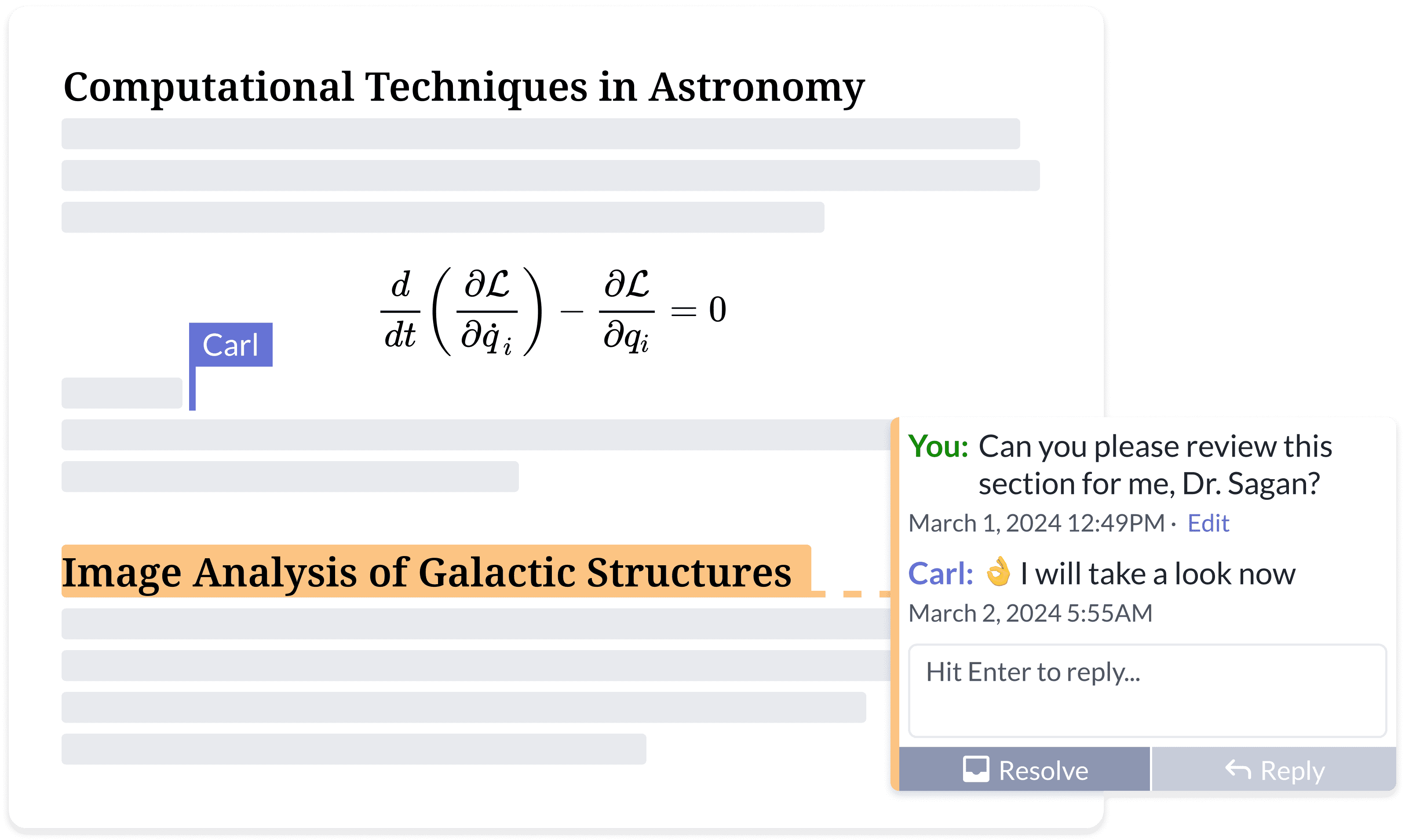
### <i class="fa-people-group">:people-group:</i> Escribe tu mejor trabajo, juntos

Di adiós a las interminables rondas de comentarios por correo electrónico.

* Accede desde cualquier lugar, en cualquier dispositivo
* Compartir documentos
* Edición y comentarios simultáneos
* Seguimiento de cambios en tiempo real
* Historial del proyecto y control de versiones
  {% endcolumn %}

{% column width="50%" %}
<figure><img src="https://cdn.overleaf.com/img/website-redesign/commenting.png" alt=""><figcaption></figcaption></figure>

{% endcolumn %}
{% endcolumns %}

{% columns %}
{% column width="50%" %}

<div align="left" data-with-frame="true"><figure><img src="/files/7651a4f92348a41d8b95988ec894aa97a7ae59e6" alt="" width="563"><figcaption></figcaption></figure></div>
{% endcolumn %}

{% column width="50%" %}

### <i class="fa-file-code">:file-code:</i> Lee más sobre la documentación para desarrolladores de Overleaf de la comunidad.

No hay muchos Overleaf `desarrollador` recursos disponibles en línea.

Aquí puedes encontrar la mayor parte de la arquitectura de Overleaf y herramientas para desarrolladores, además de algunas habilidades de depuración.

<p align="right"><a href="/spaces/I2qEfJyb19sFvDmuZcCm" class="button secondary" data-icon="book">Documentación para desarrolladores</a> </p>
{% endcolumn %}
{% endcolumns %}

{% columns %}
{% column width="50%" %}

### <i class="fa-docker">:docker:</i> $$\TeX$$ Funcionando en Docker, creado por @Ayaka-Notes

Overleaf usa <mark style="color:azul;">**Docker**</mark> contenedores para compilar tus $$\LaTeX$$ proyectos. Tu proyecto se compila en un entorno aislado de Docker, garantizando una absoluta <mark style="color:verde;">**seguridad**</mark>.

Por lo tanto, ofrecemos una $$\TeX$$ imagen en vivo (de 2019 a la más reciente) que permite cambiar libremente entre versiones, incluyendo todas las fuentes y $$\LaTeX$$ paquetes.

<a href="/spaces/0bsEVRuqHiTwccEZfTnf" class="button secondary" data-icon="docker">Imagen completa de TeX Live</a>&#x20;
{% endcolumn %}

{% column width="50%" %}

<pre class="language-latex" data-title="main.tex" data-line-numbers><code class="lang-latex"><strong>\documentclass{article}
</strong>
\title{Un documento impresionante}
\author{tu nombre}
\date{\today}

<strong>\begin{document}
</strong>\maketitle
Comienza tu contenido aquí...
\section{Introducción}
Comienza tu introducción aquí...

<strong>\end{document}
</strong></code></pre>

{% endcolumn %}
{% endcolumns %}

{% hint style="info" %}
Overleaf Pro no está afiliado con Overleaf, Inc. ni con su empresa matriz, Digital Science. Tampoco *es Server Pro* Edición, que es un producto comercial ofrecido por Overleaf, Inc. Overleaf Pro es un proyecto independiente desarrollado y mantenido por [ayaka-notes](https://github.com/ayaka-notes).
{% endhint %}


---

# Agent Instructions
This documentation is published with GitBook. GitBook is the documentation platform designed so that both humans and AI agents can read, navigate, and reason over technical content effectively. Learn more at gitbook.com.

## Querying This Documentation
If you need additional information that is not directly available in this page, you can query the documentation dynamically by asking a question.

Perform an HTTP GET request on the current page URL with the `ask` query parameter, and the optional `goal` query parameter:

```
GET https://overleaf-pro.ayaka.space/home/es/home.md?ask=<question>&goal=<endgoal>
```

`ask` is the immediate question: it should be specific, self-contained, and written in natural language.
`goal` is optional and describes the broader end goal you are ultimately trying to accomplish on behalf of the user. GitBook uses it to tailor the answer towards what is most useful for that goal.

The response will contain a direct answer to the question and relevant excerpts and sources from the documentation.

Use this mechanism when the answer is not explicitly present in the current page, you need clarification or additional context, or you want to retrieve related documentation sections.
