> For the complete documentation index, see [llms.txt](https://overleaf-pro.ayaka.space/llms.txt). Markdown versions of documentation pages are available by appending `.md` to page URLs; this page is available as [Markdown](https://overleaf-pro.ayaka.space/home/fr/home.md).

# Accueil

<h3 align="center"><mark style="color:violet;">\begin</mark> <mark style="color:$info;"><strong>{</strong></mark> <mark style="color:$primary;">Documents</mark> <mark style="color:$info;"><strong>}</strong></mark></h3>

<h2 align="center">Édition Pro Overleaf</h2>

<p align="center"><mark style="color:$info;">Édition communautaire Overleaf enrichie avec toutes les fonctionnalités Pro</mark><br><mark style="color:$info;">(open source, gratuite à utiliser, auto-hébergeable).</mark></p>

<p align="center">Écrivez comme un scientifique des fusées avec Overleaf Pro<br>— <em><mark style="color:vert;"><strong>débloquez toutes les fonctionnalités</strong></mark></em>, un <em>sur site</em> solution qui <em>tout le monde</em> peut utiliser.</p>

<p align="center"><a href="/spaces/IG3wh4WXIydQl7cvEu9K/pages/8a6d8154b4a8e01495da75e2812218534859e75b" class="button primary" data-icon="rocket-launch">Commencer</a>   <a href="/spaces/IG3wh4WXIydQl7cvEu9K/pages/7a4b0081cd40470c8bc4095d54243ab2d7437a5a" class="button secondary" data-icon="book">Lire les documents</a></p>

<p align="center"></p>

<figure><img src="/files/95513ffa8eef0ce571abd54cb34d6f17174e10a6" alt=""><figcaption></figcaption></figure>

### Fonctionnalités

<table data-view="cards"><thead><tr><th></th><th></th><th></th><th data-hidden data-card-target data-type="content-ref"></th><th data-hidden data-card-cover data-type="image">Image de couverture</th></tr></thead><tbody><tr><td><h4><i class="fa-clone">:clone:</i></h4></td><td><a href="/spaces/IG3wh4WXIydQl7cvEu9K/pages/e8e011cc350c1badf9ca613d1d204e5c6677888b#features-01-templates-system"><mark style="color:$primary;"><strong>Système de modèles</strong></mark></a></td><td><mark style="color:$info;">Publiez votre</mark>  <span class="math">\LaTeX</span> <mark style="color:$info;">modèle auprès de vos membres.</mark></td><td></td><td data-object-fit="fill"><a href="/files/609f348790b13f16381b38706a5b0cc10c2b686a">/files/609f348790b13f16381b38706a5b0cc10c2b686a</a></td></tr><tr><td><h4><i class="fa-server">:server:</i> </h4></td><td><a href="/spaces/IG3wh4WXIydQl7cvEu9K/pages/e8e011cc350c1badf9ca613d1d204e5c6677888b#features-02-sandbox-compile"><mark style="color:$primary;"><strong>Compilation en bac à sable</strong></mark></a></td><td><mark style="color:$info;">Compilez votre projet dans Docker avec isolation et n’importe quelle version de TeXLive.</mark></td><td></td><td data-object-fit="contain"><a href="/files/7e39a1db982387d3612fe684dd7f396714644801">/files/7e39a1db982387d3612fe684dd7f396714644801</a></td></tr><tr><td><h4><i class="fa-git-alt">:git-alt:</i></h4></td><td><a href="/spaces/IG3wh4WXIydQl7cvEu9K/pages/e8e011cc350c1badf9ca613d1d204e5c6677888b#features-03-git-intergration"><mark style="color:$primary;"><strong>Intégration Git</strong></mark></a></td><td><mark style="color:$info;">Synchronisez votre projet avec GitHub ou GitLab.</mark></td><td></td><td data-object-fit="fill"><a href="/files/e4940c6fcce8241d3215d6ed546872768766276d">/files/e4940c6fcce8241d3215d6ed546872768766276d</a></td></tr><tr><td><h4><i class="fa-pi">:pi:</i></h4></td><td><a href="/spaces/IG3wh4WXIydQl7cvEu9K/pages/e8e011cc350c1badf9ca613d1d204e5c6677888b#features-04-symbol-palette"><mark style="color:$primary;"><strong>Symbole</strong></mark> <mark style="color:$primary;"><strong>Palette</strong></mark></a></td><td><mark style="color:$info;">Saisissez vos symboles LaTeX facilement et plus rapidement.</mark></td><td></td><td><a href="/files/a699efec5dcfe60a5618dcfc397256736bc13987">/files/a699efec5dcfe60a5618dcfc397256736bc13987</a></td></tr><tr><td><h4><i class="fa-user">:user:</i> </h4></td><td><a href="/spaces/IG3wh4WXIydQl7cvEu9K/pages/e8e011cc350c1badf9ca613d1d204e5c6677888b#features-05-admin-panel"><mark style="color:$primary;"><strong>Gestion des utilisateurs</strong></mark></a></td><td><mark style="color:$info;">Gérez votre équipe et vos utilisateurs avec le panneau d’administration.</mark></td><td></td><td><a href="/files/036fc068f742be91640c31822399beadbc760f29">/files/036fc068f742be91640c31822399beadbc760f29</a></td></tr><tr><td><h4><i class="fa-message-pen">:message-pen:</i> </h4></td><td><a href="/spaces/IG3wh4WXIydQl7cvEu9K/pages/e8e011cc350c1badf9ca613d1d204e5c6677888b#features-06-review-panel"><mark style="color:$primary;"><strong>Panneau de révision</strong></mark></a></td><td><mark style="color:$info;">Discutez avec votre instructeur et commentez votre thèse.</mark></td><td></td><td data-object-fit="fill"><a href="/files/f0ba52a8ec8e512cc3c04cb568d6c200a4db8b1b">/files/f0ba52a8ec8e512cc3c04cb568d6c200a4db8b1b</a></td></tr><tr><td><h4><i class="fa-user-key">:user-key:</i></h4></td><td><a href="/spaces/IG3wh4WXIydQl7cvEu9K/pages/e8e011cc350c1badf9ca613d1d204e5c6677888b#features-08-sso"><mark style="color:$primary;"><strong>Prise en charge du SSO</strong></mark></a></td><td><mark style="color:$info;">Connectez-vous avec un fournisseur OAuth, SAML ou LDAP.</mark></td><td></td><td data-object-fit="fill"><a href="/files/6b0cbdf2515aedb65c61d041adb1e51c80800495">/files/6b0cbdf2515aedb65c61d041adb1e51c80800495</a></td></tr><tr><td><h4><i class="fa-table-cells-rows">:table-cells-rows:</i></h4></td><td><a href="/spaces/IG3wh4WXIydQl7cvEu9K/pages/e8e011cc350c1badf9ca613d1d204e5c6677888b#features-10-self-registeration"><mark style="color:$primary;"><strong>Auto-inscription</strong></mark></a></td><td><mark style="color:$info;">Inscrivez-vous rapidement avec un e-mail et un mot de passe.</mark></td><td></td><td data-object-fit="contain"><a href="/files/8583fb3be965c36d784e01287dc3188401e4117d">/files/8583fb3be965c36d784e01287dc3188401e4117d</a></td></tr><tr><td><h4><i class="fa-server">:server:</i></h4></td><td><a href="/spaces/IG3wh4WXIydQl7cvEu9K/pages/e8e011cc350c1badf9ca613d1d204e5c6677888b#features-09-arm-supported"><mark style="color:$primary;"><strong>Prise en charge ARM</strong></mark></a></td><td><mark style="color:$info;">Faites fonctionner votre Overleaf sur un Mac mini ou un serveur ARM.</mark></td><td></td><td data-object-fit="contain"><a href="/files/4e96c52dd4ae191934ab7dd0179ea7946a2f8547">/files/4e96c52dd4ae191934ab7dd0179ea7946a2f8547</a></td></tr><tr><td><h4><i class="fa-github">:github:</i></h4></td><td><mark style="color:$primary;"><strong>Synchronisation bidirectionnelle GitHub</strong></mark></td><td><mark style="color:$info;">Bientôt disponible.</mark></td><td></td><td data-object-fit="contain"><a href="/files/380b3ebdad44d44ebc6e9ae55bf5e6677a25d62e">/files/380b3ebdad44d44ebc6e9ae55bf5e6677a25d62e</a></td></tr></tbody></table>

{% columns %}
{% column width="50%" %}
{% embed url="<https://files.gitbook.com/v0/b/gitbook-x-prod.appspot.com/o/spaces%2FvnT8IAADTAThJZZpvM7Q%2Fuploads%2FfCJEXeyRbeQLodXhHrxD%2FQQ20260326-173245.mp4?alt=media&token=86111cae-293e-4ba7-9fc5-ee63500a0f85>" %}
{% endcolumn %}

{% column width="50%" %}

### <i class="fa-rocket-launch">:rocket-launch:</i> Profitez de l’IA $$\LaTeX$$ Éditeur

* Discutez avec un agent IA
* Reformulez avec ChatGPT ou tout autre LLM
* Disponible bientôt......
  {% endcolumn %}
  {% endcolumns %}

{% columns %}
{% column width="50%" %}

### <i class="fa-github">:github:</i>  Passez sur site en 5 minutes

Configurer votre propre Ovlereaf Pro et votre $$\LaTeX$$ environnement en ligne avec **GitHub Codespace** immédiatement !

Vous n’avez besoin d’aucune compétence en Linux ou en gestion de serveur, juste <mark style="color:$primary;">**Déploiement en un clic**</mark> sur GitHub !

***

<a href="https://github.com/ayaka-notes/overleaf" class="button primary" data-icon="server">Démarrer sur GitHub</a> <a href="/spaces/IG3wh4WXIydQl7cvEu9K/pages/2319c2db7cba791439b14810657c3a652bd3c1ba" class="button secondary" data-icon="terminal">Déploiement manuel</a>
{% endcolumn %}

{% column width="50%" %}
{% code title="init.sh" %}

```bash
#/bin/bash
# 1. Installez votre environnement Docker
sudo apt-get install docker

# 2. Clonez Overleaf Toolkit
cd toolkit && bin/init

# 3. Configurez votre Overleaf

# 4. Terminez votre installation
# ...
```

{% endcode %}
{% endcolumn %}
{% endcolumns %}

{% columns %}
{% column width="41.66666666666667%" %}
{% embed url="<https://files.gitbook.com/v0/b/gitbook-x-prod.appspot.com/o/spaces%2FvnT8IAADTAThJZZpvM7Q%2Fuploads%2FMVJjuRaBQnhqbqkw8YpL%2Fvisual-editor.mp4?alt=media&token=13e11fa4-e682-460f-9555-ad9b419fe953>" %}
{% endcolumn %}

{% column width="58.33333333333333%" %}

### <i class="fa-globe">:globe:</i>  Profitez en ligne $$\LaTeX$$ Éditeur

Pas de téléchargement, pas de configuration, et pas besoin de savoir $$\LaTeX$$ avant de commencer.

* Éditeur visuel et éditeur de code
* Des milliers de modèles gratuits
* Guide détaillé et apprentissage de LaTeX
* Un support exceptionnel de véritables experts TeX

<p align="right"><a href="https://www.overleaf.com/" class="button primary" data-icon="leaf">Aller sur Overleaf officiel</a><a href="https://www.overleaf.com/learn" class="button secondary" data-icon="book-open">Apprendre LaTeX</a></p>
{% endcolumn %}
{% endcolumns %}

{% columns %}
{% column width="50%" valign="middle" %}

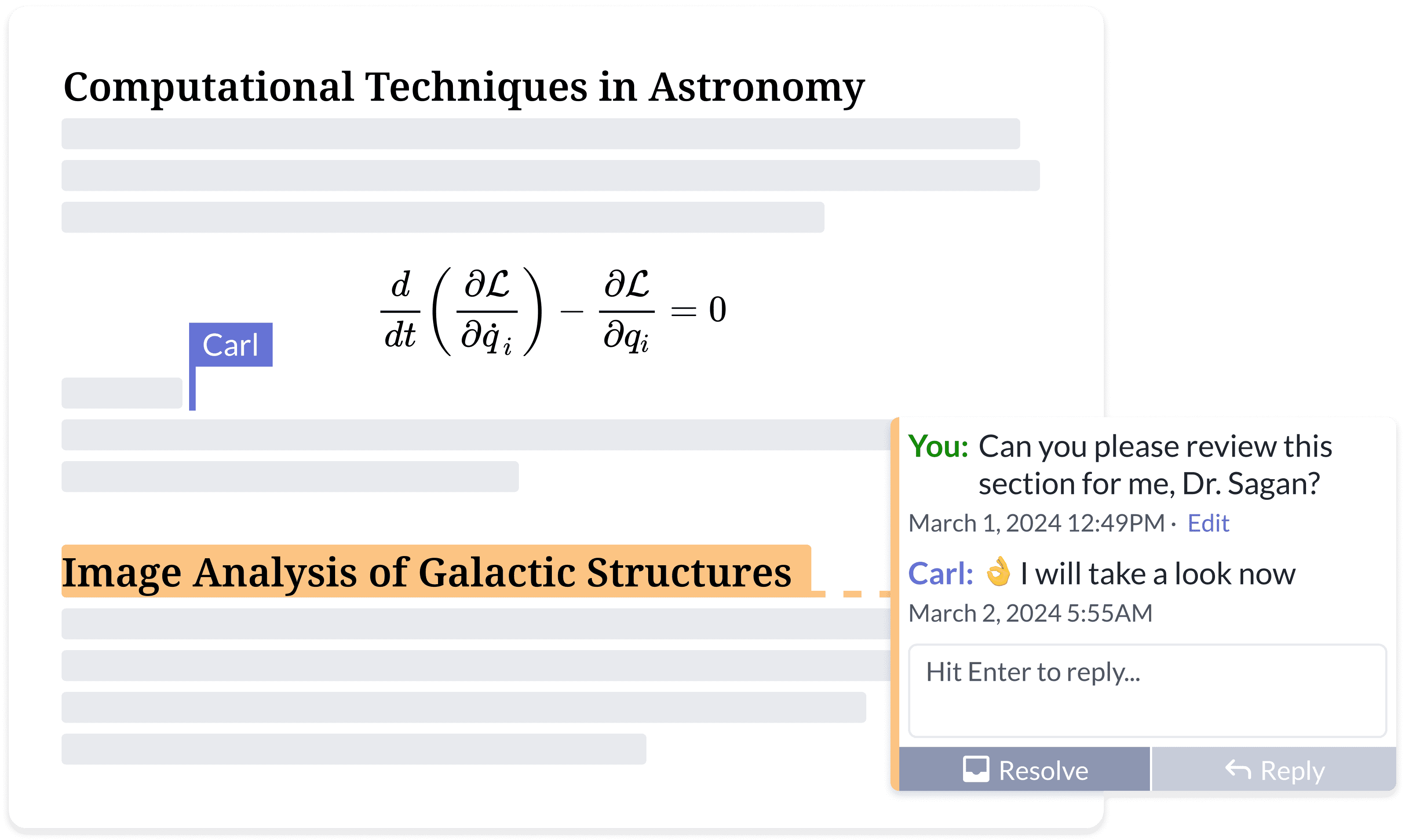
### <i class="fa-people-group">:people-group:</i> Réalisez ensemble vos meilleurs travaux

Dites adieu aux allers-retours sans fin de commentaires par e-mail.

* Accédez depuis n’importe où, sur n’importe quel appareil
* Partage de documents
* Édition et commentaires simultanés
* Suivi des modifications en temps réel
* Historique du projet et contrôle de version
  {% endcolumn %}

{% column width="50%" %}
<figure><img src="https://cdn.overleaf.com/img/website-redesign/commenting.png" alt=""><figcaption></figcaption></figure>

{% endcolumn %}
{% endcolumns %}

{% columns %}
{% column width="50%" %}

<div align="left" data-with-frame="true"><figure><img src="/files/8f7801bf78fc7cc6dd61c204f09414638704615a" alt="" width="563"><figcaption></figcaption></figure></div>
{% endcolumn %}

{% column width="50%" %}

### <i class="fa-file-code">:file-code:</i> En savoir plus sur la documentation développeur d’Overleaf par la communauté.

Il n’y a pas beaucoup de `développeur` ressources disponibles en ligne.

Ici, vous pouvez trouver l’essentiel de l’architecture d’Overleaf et des outils développeur, ainsi que quelques compétences de débogage.

<p align="right"><a href="/spaces/I2qEfJyb19sFvDmuZcCm" class="button secondary" data-icon="book">Documentation développeur</a> </p>
{% endcolumn %}
{% endcolumns %}

{% columns %}
{% column width="50%" %}

### <i class="fa-docker">:docker:</i> $$\TeX$$ Exécuté dans Docker, créé par @Ayaka-Notes

Overleaf utilise <mark style="color:bleu;">**Docker**</mark> des conteneurs pour compiler vos $$\LaTeX$$ projets. Votre projet est compilé dans un bac à sable Docker isolé, garantissant une sécurité absolue <mark style="color:vert;">**sécurité**</mark>.

C’est pourquoi nous fournissons une $$\TeX$$ image Live (de 2019 à la version la plus récente) permettant de passer librement d’une version à l’autre, avec toutes les polices et $$\LaTeX$$ paquets.

<a href="/spaces/0bsEVRuqHiTwccEZfTnf" class="button secondary" data-icon="docker">Image TeXLive complète</a>&#x20;
{% endcolumn %}

{% column width="50%" %}

<pre class="language-latex" data-title="main.tex" data-line-numbers><code class="lang-latex"><strong>\documentclass{article}
</strong>
\title{Un document génial}
\author{votre nom}
\date{\today}

<strong>\begin{document}
</strong>\maketitle
Commencez votre contenu ici...
\section{Introduction}
Commencez votre introduction ici...

<strong>\end{document}
</strong></code></pre>

{% endcolumn %}
{% endcolumns %}

{% hint style="info" %}
Overleaf Pro n’est pas affilié à Overleaf, Inc. ni à sa société mère, Digital Science. Ce n’est pas non plus *l’édition Server Pro* , qui est un produit commercial proposé par Overleaf, Inc. Overleaf Pro est un projet indépendant développé et maintenu par [ayaka-notes](https://github.com/ayaka-notes).
{% endhint %}


---

# Agent Instructions
This documentation is published with GitBook. GitBook is the documentation platform designed so that both humans and AI agents can read, navigate, and reason over technical content effectively. Learn more at gitbook.com.

## Querying This Documentation
If you need additional information that is not directly available in this page, you can query the documentation dynamically by asking a question.

Perform an HTTP GET request on the current page URL with the `ask` query parameter, and the optional `goal` query parameter:

```
GET https://overleaf-pro.ayaka.space/home/fr/home.md?ask=<question>&goal=<endgoal>
```

`ask` is the immediate question: it should be specific, self-contained, and written in natural language.
`goal` is optional and describes the broader end goal you are ultimately trying to accomplish on behalf of the user. GitBook uses it to tailor the answer towards what is most useful for that goal.

The response will contain a direct answer to the question and relevant excerpts and sources from the documentation.

Use this mechanism when the answer is not explicitly present in the current page, you need clarification or additional context, or you want to retrieve related documentation sections.
