> For the complete documentation index, see [llms.txt](https://overleaf-pro.ayaka.space/llms.txt). Markdown versions of documentation pages are available by appending `.md` to page URLs; this page is available as [Markdown](https://overleaf-pro.ayaka.space/home/it/home.md).

# Pagina iniziale

<h3 align="center"><mark style="color:viola;">\begin</mark> <mark style="color:$info;"><strong>{</strong></mark> <mark style="color:$primary;">Documenti</mark> <mark style="color:$info;"><strong>}</strong></mark></h3>

<h2 align="center">Overleaf Pro Edition</h2>

<p align="center"><mark style="color:$info;">Overleaf Community Edition potenziata con tutte le funzionalità Pro</mark><br><mark style="color:$info;">(open source, gratuita da usare, ospitabile in self-hosting).</mark></p>

<p align="center">Scrivi come uno scienziato missilistico con Overleaf Pro<br>— <em><mark style="color:verde;"><strong>sblocca tutte le funzionalità</strong></mark></em>, un <em>on-premise</em> soluzione che <em>chiunque</em> può usare.</p>

<p align="center"><a href="/spaces/yLFrF2L1FakWXkhqpOnS/pages/W4THeswYLuFORUQh0ou0" class="button primary" data-icon="rocket-launch">Inizia</a>   <a href="/spaces/yLFrF2L1FakWXkhqpOnS/pages/2c77b09820f297feda7d8f3e26f870c4f1ff7e82" class="button secondary" data-icon="book">Leggi i documenti</a></p>

<p align="center"></p>

<figure><img src="/files/e613c6fc8ba87634a451a61a260afcd315787952" alt=""><figcaption></figcaption></figure>

### Funzionalità

<table data-view="cards"><thead><tr><th></th><th></th><th></th><th data-hidden data-card-target data-type="content-ref"></th><th data-hidden data-card-cover data-type="image">Immagine di copertina</th></tr></thead><tbody><tr><td><h4><i class="fa-clone">:clone:</i></h4></td><td><a href="/spaces/yLFrF2L1FakWXkhqpOnS/pages/BI1vIvH9Q0DHZ5hNXgEM#features-01-templates-system"><mark style="color:$primary;"><strong>Sistema di template</strong></mark></a></td><td><mark style="color:$info;">Pubblica il tuo</mark>  <span class="math">\LaTeX</span> <mark style="color:$info;">template ai tuoi membri.</mark></td><td></td><td data-object-fit="fill"><a href="/files/ff92e68c5300cb2f7c9e717361bfd36ecd31d1a9">/files/ff92e68c5300cb2f7c9e717361bfd36ecd31d1a9</a></td></tr><tr><td><h4><i class="fa-server">:server:</i> </h4></td><td><a href="/spaces/yLFrF2L1FakWXkhqpOnS/pages/BI1vIvH9Q0DHZ5hNXgEM#features-02-sandbox-compile"><mark style="color:$primary;"><strong>Compilazione sandbox</strong></mark></a></td><td><mark style="color:$info;">Compila il tuo progetto in Docker con isolamento e qualsiasi versione di TeXLive.</mark></td><td></td><td data-object-fit="contain"><a href="/files/375f19971be104f062507ad89295fe74fa458a7f">/files/375f19971be104f062507ad89295fe74fa458a7f</a></td></tr><tr><td><h4><i class="fa-git-alt">:git-alt:</i></h4></td><td><a href="/spaces/yLFrF2L1FakWXkhqpOnS/pages/BI1vIvH9Q0DHZ5hNXgEM#features-03-git-intergration"><mark style="color:$primary;"><strong>Integrazione Git</strong></mark></a></td><td><mark style="color:$info;">Sincronizza il tuo progetto con GitHub o GitLab.</mark></td><td></td><td data-object-fit="fill"><a href="/files/2eb8b16f46dae7aafcd7dec7662f44af40e649bc">/files/2eb8b16f46dae7aafcd7dec7662f44af40e649bc</a></td></tr><tr><td><h4><i class="fa-pi">:pi:</i></h4></td><td><a href="/spaces/yLFrF2L1FakWXkhqpOnS/pages/BI1vIvH9Q0DHZ5hNXgEM#features-04-symbol-palette"><mark style="color:$primary;"><strong>Simbolo</strong></mark> <mark style="color:$primary;"><strong>Tavolozza</strong></mark></a></td><td><mark style="color:$info;">Inserisci i tuoi simboli LaTeX facilmente e più rapidamente.</mark></td><td></td><td><a href="/files/03b385638223f9439b9c3e551ffa4d4a2bad6747">/files/03b385638223f9439b9c3e551ffa4d4a2bad6747</a></td></tr><tr><td><h4><i class="fa-user">:user:</i> </h4></td><td><a href="/spaces/yLFrF2L1FakWXkhqpOnS/pages/BI1vIvH9Q0DHZ5hNXgEM#features-05-admin-panel"><mark style="color:$primary;"><strong>Gestione utenti</strong></mark></a></td><td><mark style="color:$info;">Gestisci il tuo team e gli utenti con il pannello di amministrazione.</mark></td><td></td><td><a href="/files/afd7411ebe32b4b026dc537224de32fb79335b77">/files/afd7411ebe32b4b026dc537224de32fb79335b77</a></td></tr><tr><td><h4><i class="fa-message-pen">:message-pen:</i> </h4></td><td><a href="/spaces/yLFrF2L1FakWXkhqpOnS/pages/BI1vIvH9Q0DHZ5hNXgEM#features-06-review-panel"><mark style="color:$primary;"><strong>Pannello di revisione</strong></mark></a></td><td><mark style="color:$info;">Discuti con il tuo relatore e commenta la tua tesi.</mark></td><td></td><td data-object-fit="fill"><a href="/files/24fa707337743f846371e083bfafa992d94fb14f">/files/24fa707337743f846371e083bfafa992d94fb14f</a></td></tr><tr><td><h4><i class="fa-user-key">:user-key:</i></h4></td><td><a href="/spaces/yLFrF2L1FakWXkhqpOnS/pages/BI1vIvH9Q0DHZ5hNXgEM#features-08-sso"><mark style="color:$primary;"><strong>Supporto SSO</strong></mark></a></td><td><mark style="color:$info;">Connettiti con un provider OAuth, SAML o LDAP.</mark></td><td></td><td data-object-fit="fill"><a href="/files/af5beb9feabe3f86b251e1a8656fd4ee7233721e">/files/af5beb9feabe3f86b251e1a8656fd4ee7233721e</a></td></tr><tr><td><h4><i class="fa-table-cells-rows">:table-cells-rows:</i></h4></td><td><a href="/spaces/yLFrF2L1FakWXkhqpOnS/pages/BI1vIvH9Q0DHZ5hNXgEM#features-10-self-registeration"><mark style="color:$primary;"><strong>Autoregistrazione</strong></mark></a></td><td><mark style="color:$info;">Registrati rapidamente con email e password.</mark></td><td></td><td data-object-fit="contain"><a href="/files/dc5211e36943a9a425d4d5f44fe823759e7492b0">/files/dc5211e36943a9a425d4d5f44fe823759e7492b0</a></td></tr><tr><td><h4><i class="fa-server">:server:</i></h4></td><td><a href="/spaces/yLFrF2L1FakWXkhqpOnS/pages/BI1vIvH9Q0DHZ5hNXgEM#features-09-arm-supported"><mark style="color:$primary;"><strong>Supporto ARM</strong></mark></a></td><td><mark style="color:$info;">Esegui il tuo Overleaf con Mac mini o un server ARM.</mark></td><td></td><td data-object-fit="contain"><a href="/files/0b2ede4a973e252d61e59f809ff5fe3c5a39119d">/files/0b2ede4a973e252d61e59f809ff5fe3c5a39119d</a></td></tr><tr><td><h4><i class="fa-github">:github:</i></h4></td><td><mark style="color:$primary;"><strong>Sincronizzazione bidirezionale con GitHub</strong></mark></td><td><mark style="color:$info;">Prossimamente.</mark></td><td></td><td data-object-fit="contain"><a href="/files/97418c93b99577adf96f1ab5a969efab04febf3e">/files/97418c93b99577adf96f1ab5a969efab04febf3e</a></td></tr></tbody></table>

{% columns %}
{% column width="50%" %}
{% embed url="<https://files.gitbook.com/v0/b/gitbook-x-prod.appspot.com/o/spaces%2FvnT8IAADTAThJZZpvM7Q%2Fuploads%2FfCJEXeyRbeQLodXhHrxD%2FQQ20260326-173245.mp4?alt=media&token=86111cae-293e-4ba7-9fc5-ee63500a0f85>" %}
{% endcolumn %}

{% column width="50%" %}

### <i class="fa-rocket-launch">:rocket-launch:</i> Goditi l'IA $$\LaTeX$$ Editor

* Chatta con un agente IA
* Riformula con ChatGPT o qualsiasi LLM
* Disponibile presto......
  {% endcolumn %}
  {% endcolumns %}

{% columns %}
{% column width="50%" %}

### <i class="fa-github">:github:</i>  Porta in locale in 5 minuti

Configurare il tuo Overleaf Pro e il tuo ambiente online $$\LaTeX$$ ambiente con **GitHub Codespace** immediatamente!

Non ti serve alcuna competenza con Linux o nella gestione del server, solo <mark style="color:$primary;">**Distribuzione con un clic**</mark> su GitHub!

***

<a href="https://github.com/ayaka-notes/overleaf" class="button primary" data-icon="server">Inizia su GitHub</a> <a href="/spaces/yLFrF2L1FakWXkhqpOnS/pages/BPDTeZRT94TV3fTkvysz" class="button secondary" data-icon="terminal">Distribuzione manuale</a>
{% endcolumn %}

{% column width="50%" %}
{% code title="init.sh" %}

```bash
#/bin/bash
# 1. Installa il tuo ambiente Docker
sudo apt-get install docker

# 2. Clona Overleaf Toolkit
cd toolkit && bin/init

# 3. Configura il tuo Overleaf

# 4. Completa l'installazione
# ...
```

{% endcode %}
{% endcolumn %}
{% endcolumns %}

{% columns %}
{% column width="41.66666666666667%" %}
{% embed url="<https://files.gitbook.com/v0/b/gitbook-x-prod.appspot.com/o/spaces%2FvnT8IAADTAThJZZpvM7Q%2Fuploads%2FMVJjuRaBQnhqbqkw8YpL%2Fvisual-editor.mp4?alt=media&token=13e11fa4-e682-460f-9555-ad9b419fe953>" %}
{% endcolumn %}

{% column width="58.33333333333333%" %}

### <i class="fa-globe">:globe:</i>  Usa online $$\LaTeX$$ Editor

Nessun download, nessuna configurazione e nessuna necessità di conoscere $$\LaTeX$$ prima di iniziare.

* Editor visuale ed editor di codice
* Migliaia di template gratuiti
* Guida dettagliata e apprendimento di LaTeX
* Supporto straordinario da veri esperti TeX

<p align="right"><a href="https://www.overleaf.com/" class="button primary" data-icon="leaf">Vai a Overleaf ufficiale</a><a href="https://www.overleaf.com/learn" class="button secondary" data-icon="book-open">Impara LaTeX</a></p>
{% endcolumn %}
{% endcolumns %}

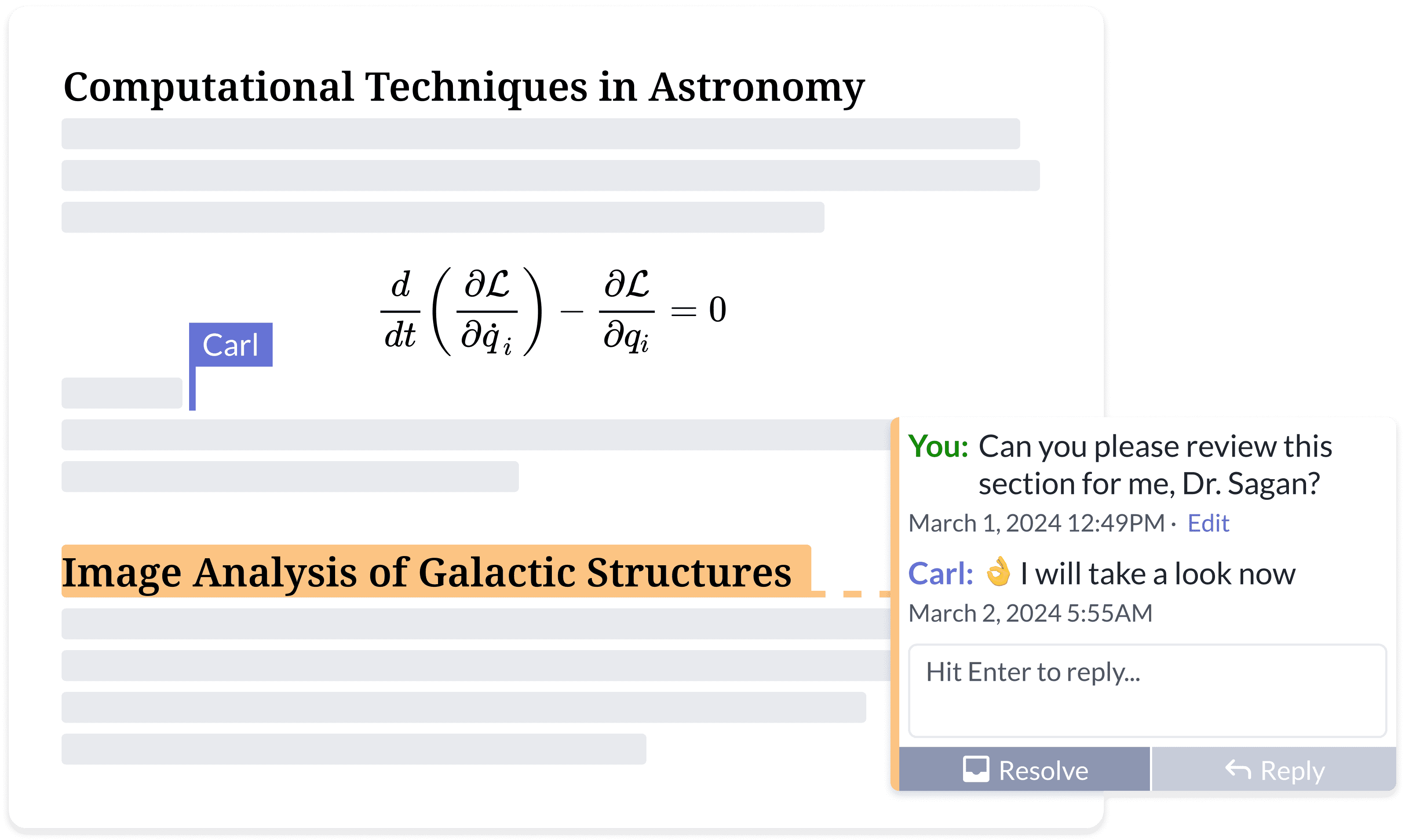
{% columns %}
{% column width="50%" valign="middle" %}

### <i class="fa-people-group">:people-group:</i> Scrivi insieme il tuo lavoro migliore

Dì addio agli infiniti scambi di feedback via email.

* Accedi ovunque, su qualsiasi dispositivo
* Condivisione dei documenti
* Modifica e commenti simultanei
* Tracciamento delle modifiche in tempo reale
* Cronologia del progetto e controllo delle versioni
  {% endcolumn %}

{% column width="50%" %}
<figure><img src="https://cdn.overleaf.com/img/website-redesign/commenting.png" alt=""><figcaption></figcaption></figure>

{% endcolumn %}
{% endcolumns %}

{% columns %}
{% column width="50%" %}

<div align="left" data-with-frame="true"><figure><img src="/files/d4ee0debf664dc6ba3fc149959ac38bc7123e42a" alt="" width="563"><figcaption></figcaption></figure></div>
{% endcolumn %}

{% column width="50%" %}

### <i class="fa-file-code">:file-code:</i> Scopri di più sulla documentazione per sviluppatori di overleaf della community.

Non ci sono molte risorse `per sviluppatori` di Overleaf disponibili online.

Qui puoi trovare gran parte dell'architettura di Overleaf e degli strumenti per sviluppatori, oltre ad alcune competenze di debug.

<p align="right"><a href="/spaces/I2qEfJyb19sFvDmuZcCm" class="button secondary" data-icon="book">Documentazione per sviluppatori</a> </p>
{% endcolumn %}
{% endcolumns %}

{% columns %}
{% column width="50%" %}

### <i class="fa-docker">:docker:</i> $$\TeX$$ Live in Docker creato da @Ayaka-Notes

Overleaf usa <mark style="color:blu;">**Docker**</mark> contenitori per compilare i tuoi $$\LaTeX$$ progetti. Il tuo progetto viene compilato in una sandbox Docker isolata, garantendo assoluta <mark style="color:verde;">**sicurezza**</mark>.

Pertanto, forniamo una $$\TeX$$ immagine Live (dal 2019 all'ultima versione) che consente di passare liberamente tra le versioni, includendo tutti i font e $$\LaTeX$$ i pacchetti.

<a href="/spaces/0bsEVRuqHiTwccEZfTnf" class="button secondary" data-icon="docker">Immagine completa TeXLive</a>&#x20;
{% endcolumn %}

{% column width="50%" %}

<pre class="language-latex" data-title="main.tex" data-line-numbers><code class="lang-latex"><strong>\documentclass{article}
</strong>
\title{Un documento fantastico}
\author{il tuo nome}
\date{\today}

<strong>\begin{document}
</strong>\maketitle
Inizia qui i tuoi contenuti...
\section{Introduzione}
Inizia qui la tua introduzione...

<strong>\end{document}
</strong></code></pre>

{% endcolumn %}
{% endcolumns %}

{% hint style="info" %}
Overleaf Pro non è affiliato a Overleaf, Inc. né alla sua società madre, Digital Science. Inoltre è anche *non Server Pro* Edition, che è un prodotto commerciale offerto da Overleaf, Inc. Overleaf Pro è un progetto indipendente sviluppato e mantenuto da [ayaka-notes](https://github.com/ayaka-notes).
{% endhint %}


---

# Agent Instructions
This documentation is published with GitBook. GitBook is the documentation platform designed so that both humans and AI agents can read, navigate, and reason over technical content effectively. Learn more at gitbook.com.

## Querying This Documentation
If you need additional information that is not directly available in this page, you can query the documentation dynamically by asking a question.

Perform an HTTP GET request on the current page URL with the `ask` query parameter, and the optional `goal` query parameter:

```
GET https://overleaf-pro.ayaka.space/home/it/home.md?ask=<question>&goal=<endgoal>
```

`ask` is the immediate question: it should be specific, self-contained, and written in natural language.
`goal` is optional and describes the broader end goal you are ultimately trying to accomplish on behalf of the user. GitBook uses it to tailor the answer towards what is most useful for that goal.

The response will contain a direct answer to the question and relevant excerpts and sources from the documentation.

Use this mechanism when the answer is not explicitly present in the current page, you need clarification or additional context, or you want to retrieve related documentation sections.
