> For the complete documentation index, see [llms.txt](https://overleaf-pro.ayaka.space/llms.txt). Markdown versions of documentation pages are available by appending `.md` to page URLs; this page is available as [Markdown](https://overleaf-pro.ayaka.space/home/ko/home.md).

# 홈

<h3 align="center"><mark style="color:보라색;">\begin</mark> <mark style="color:$info;"><strong>{</strong></mark> <mark style="color:$primary;">문서</mark> <mark style="color:$info;"><strong>}</strong></mark></h3>

<h2 align="center">Overleaf Pro 에디션</h2>

<p align="center"><mark style="color:$info;">모든 Pro 기능이 추가된 Overleaf Community Edition</mark><br><mark style="color:$info;">(오픈 소스, 무료 사용, 자체 호스팅 가능).</mark></p>

<p align="center">Overleaf Pro로 로켓 과학자처럼 글을 쓰세요<br>— <em><mark style="color:초록색;"><strong>모든 기능 잠금 해제</strong></mark></em>, 하나의 <em>온프레미스</em> 솔루션으로서 <em>누구나</em> 사용할 수 있습니다.</p>

<p align="center"><a href="/spaces/yLFrF2L1FakWXkhqpOnS/pages/W4THeswYLuFORUQh0ou0" class="button primary" data-icon="rocket-launch">시작하기</a>   <a href="/spaces/yLFrF2L1FakWXkhqpOnS/pages/2c77b09820f297feda7d8f3e26f870c4f1ff7e82" class="button secondary" data-icon="book">문서 읽기</a></p>

<p align="center"></p>

<figure><img src="/files/a6cae2cb5621a1a5ee2b8887e999809b7fa2a27c" alt=""><figcaption></figcaption></figure>

### 기능

<table data-view="cards"><thead><tr><th></th><th></th><th></th><th data-hidden data-card-target data-type="content-ref"></th><th data-hidden data-card-cover data-type="image">표지 이미지</th></tr></thead><tbody><tr><td><h4><i class="fa-clone">:clone:</i></h4></td><td><a href="/spaces/yLFrF2L1FakWXkhqpOnS/pages/BI1vIvH9Q0DHZ5hNXgEM#features-01-templates-system"><mark style="color:$primary;"><strong>템플릿 시스템</strong></mark></a></td><td><mark style="color:$info;">게시하세요</mark>  <span class="math">\LaTeX</span> <mark style="color:$info;">템플릿을 회원들에게.</mark></td><td></td><td data-object-fit="fill"><a href="/files/b9f9adc2b818c4183db0ed7eae3b3e27b5507893">/files/b9f9adc2b818c4183db0ed7eae3b3e27b5507893</a></td></tr><tr><td><h4><i class="fa-server">:server:</i> </h4></td><td><a href="/spaces/yLFrF2L1FakWXkhqpOnS/pages/BI1vIvH9Q0DHZ5hNXgEM#features-02-sandbox-compile"><mark style="color:$primary;"><strong>샌드박스 컴파일</strong></mark></a></td><td><mark style="color:$info;">격리된 Docker 환경에서 원하는 TeXLive 버전으로 프로젝트를 컴파일하세요.</mark></td><td></td><td data-object-fit="contain"><a href="/files/f57b110d9edbf54b4d5ead65e168656edf093397">/files/f57b110d9edbf54b4d5ead65e168656edf093397</a></td></tr><tr><td><h4><i class="fa-git-alt">:git-alt:</i></h4></td><td><a href="/spaces/yLFrF2L1FakWXkhqpOnS/pages/BI1vIvH9Q0DHZ5hNXgEM#features-03-git-intergration"><mark style="color:$primary;"><strong>Git 통합</strong></mark></a></td><td><mark style="color:$info;">프로젝트를 GitHub 또는 GitLab과 동기화하세요.</mark></td><td></td><td data-object-fit="fill"><a href="/files/4d66aa2556732a2d272c10435f228ae91e8a7e0d">/files/4d66aa2556732a2d272c10435f228ae91e8a7e0d</a></td></tr><tr><td><h4><i class="fa-pi">:pi:</i></h4></td><td><a href="/spaces/yLFrF2L1FakWXkhqpOnS/pages/BI1vIvH9Q0DHZ5hNXgEM#features-04-symbol-palette"><mark style="color:$primary;"><strong>기호</strong></mark> <mark style="color:$primary;"><strong>팔레트</strong></mark></a></td><td><mark style="color:$info;">LaTeX 기호를 쉽고 빠르게 입력하세요.</mark></td><td></td><td><a href="/files/311faef1439a6424277467f7bea4350788b0dc43">/files/311faef1439a6424277467f7bea4350788b0dc43</a></td></tr><tr><td><h4><i class="fa-user">:user:</i> </h4></td><td><a href="/spaces/yLFrF2L1FakWXkhqpOnS/pages/BI1vIvH9Q0DHZ5hNXgEM#features-05-admin-panel"><mark style="color:$primary;"><strong>사용자 관리</strong></mark></a></td><td><mark style="color:$info;">관리 패널에서 팀과 사용자를 관리하세요.</mark></td><td></td><td><a href="/files/daf205f20534466f8df3e737af86fc4aa847a04c">/files/daf205f20534466f8df3e737af86fc4aa847a04c</a></td></tr><tr><td><h4><i class="fa-message-pen">:message-pen:</i> </h4></td><td><a href="/spaces/yLFrF2L1FakWXkhqpOnS/pages/BI1vIvH9Q0DHZ5hNXgEM#features-06-review-panel"><mark style="color:$primary;"><strong>검토 패널</strong></mark></a></td><td><mark style="color:$info;">지도교수와 논의하고 논문에 댓글을 남기세요.</mark></td><td></td><td data-object-fit="fill"><a href="/files/34ccd01a281d1c24da938973f1e4cae4bd2a1df0">/files/34ccd01a281d1c24da938973f1e4cae4bd2a1df0</a></td></tr><tr><td><h4><i class="fa-user-key">:user-key:</i></h4></td><td><a href="/spaces/yLFrF2L1FakWXkhqpOnS/pages/BI1vIvH9Q0DHZ5hNXgEM#features-08-sso"><mark style="color:$primary;"><strong>SSO 지원</strong></mark></a></td><td><mark style="color:$info;">OAuth SAML 또는 LDAP 제공자와 연결하세요.</mark></td><td></td><td data-object-fit="fill"><a href="/files/d2be455fe72b4a2f65de0e1e2648c4d798375826">/files/d2be455fe72b4a2f65de0e1e2648c4d798375826</a></td></tr><tr><td><h4><i class="fa-table-cells-rows">:table-cells-rows:</i></h4></td><td><a href="/spaces/yLFrF2L1FakWXkhqpOnS/pages/BI1vIvH9Q0DHZ5hNXgEM#features-10-self-registeration"><mark style="color:$primary;"><strong>자체 가입</strong></mark></a></td><td><mark style="color:$info;">이메일과 비밀번호로 빠르게 가입하세요.</mark></td><td></td><td data-object-fit="contain"><a href="/files/8f269c1981fcabdf5b6a7b70fac925e24d50a04d">/files/8f269c1981fcabdf5b6a7b70fac925e24d50a04d</a></td></tr><tr><td><h4><i class="fa-server">:server:</i></h4></td><td><a href="/spaces/yLFrF2L1FakWXkhqpOnS/pages/BI1vIvH9Q0DHZ5hNXgEM#features-09-arm-supported"><mark style="color:$primary;"><strong>ARM 지원</strong></mark></a></td><td><mark style="color:$info;">Mac mini 또는 ARM 서버에서 Overleaf를 실행하세요.</mark></td><td></td><td data-object-fit="contain"><a href="/files/d2fe32ddcaab034c79bd22d18f02486768ead4c5">/files/d2fe32ddcaab034c79bd22d18f02486768ead4c5</a></td></tr><tr><td><h4><i class="fa-github">:github:</i></h4></td><td><mark style="color:$primary;"><strong>GitHub 양방향 동기화</strong></mark></td><td><mark style="color:$info;">곧 제공 예정.</mark></td><td></td><td data-object-fit="contain"><a href="/files/be6e4f279d10bc2295143fe07b7d267fd84d7295">/files/be6e4f279d10bc2295143fe07b7d267fd84d7295</a></td></tr></tbody></table>

{% columns %}
{% column width="50%" %}
{% embed url="<https://files.gitbook.com/v0/b/gitbook-x-prod.appspot.com/o/spaces%2FvnT8IAADTAThJZZpvM7Q%2Fuploads%2FfCJEXeyRbeQLodXhHrxD%2FQQ20260326-173245.mp4?alt=media&token=86111cae-293e-4ba7-9fc5-ee63500a0f85>" %}
{% endcolumn %}

{% column width="50%" %}

### <i class="fa-rocket-launch">:rocket-launch:</i> AI를 즐기세요 $$\LaTeX$$ 편집기

* AI 에이전트와 채팅하세요
* Chat GPT 또는 다른 LLM으로 다시 표현하세요
* 곧 제공 예정......
  {% endcolumn %}
  {% endcolumns %}

{% columns %}
{% column width="50%" %}

### <i class="fa-github">:github:</i>  5분 만에 온프레미스로 전환하기

자신만의 Ovlereaf Pro와 온라인 $$\LaTeX$$ 환경을 **GitHub Codespace** 즉시!

Linux나 서버 관리 기술은 전혀 필요하지 않습니다. 그저 <mark style="color:$primary;">**원클릭 배포**</mark> GitHub에서!

***

<a href="https://github.com/ayaka-notes/overleaf" class="button primary" data-icon="server">GitHub에서 시작하기</a> <a href="/spaces/yLFrF2L1FakWXkhqpOnS/pages/BPDTeZRT94TV3fTkvysz" class="button secondary" data-icon="terminal">수동 배포</a>
{% endcolumn %}

{% column width="50%" %}
{% code title="init.sh" %}

```bash
#/bin/bash
# 1. Docker 환경을 설치하세요
sudo apt-get install docker

# 2. Overleaf Toolkit을 복제하세요
cd toolkit && bin/init

# 3. Overleaf를 설정하세요

# 4. 설치를 완료하세요
# ...
```

{% endcode %}
{% endcolumn %}
{% endcolumns %}

{% columns %}
{% column width="41.66666666666667%" %}
{% embed url="<https://files.gitbook.com/v0/b/gitbook-x-prod.appspot.com/o/spaces%2FvnT8IAADTAThJZZpvM7Q%2Fuploads%2FMVJjuRaBQnhqbqkw8YpL%2Fvisual-editor.mp4?alt=media&token=13e11fa4-e682-460f-9555-ad9b419fe953>" %}
{% endcolumn %}

{% column width="58.33333333333333%" %}

### <i class="fa-globe">:globe:</i>  온라인을 즐기세요 $$\LaTeX$$ 편집기

다운로드도, 설정도 필요 없고, 알아야 할 것도 없습니다 $$\LaTeX$$ 시작하기 전에.

* 시각적 편집기와 코드 편집기
* 수천 개의 무료 템플릿
* 자세한 안내와 LaTeX 학습
* 실제 TeX 전문가들의 뛰어난 지원

<p align="right"><a href="https://www.overleaf.com/" class="button primary" data-icon="leaf">Overleaf 공식 사이트로 이동</a><a href="https://www.overleaf.com/learn" class="button secondary" data-icon="book-open">LaTeX 배우기</a></p>
{% endcolumn %}
{% endcolumns %}

{% columns %}
{% column width="50%" valign="middle" %}

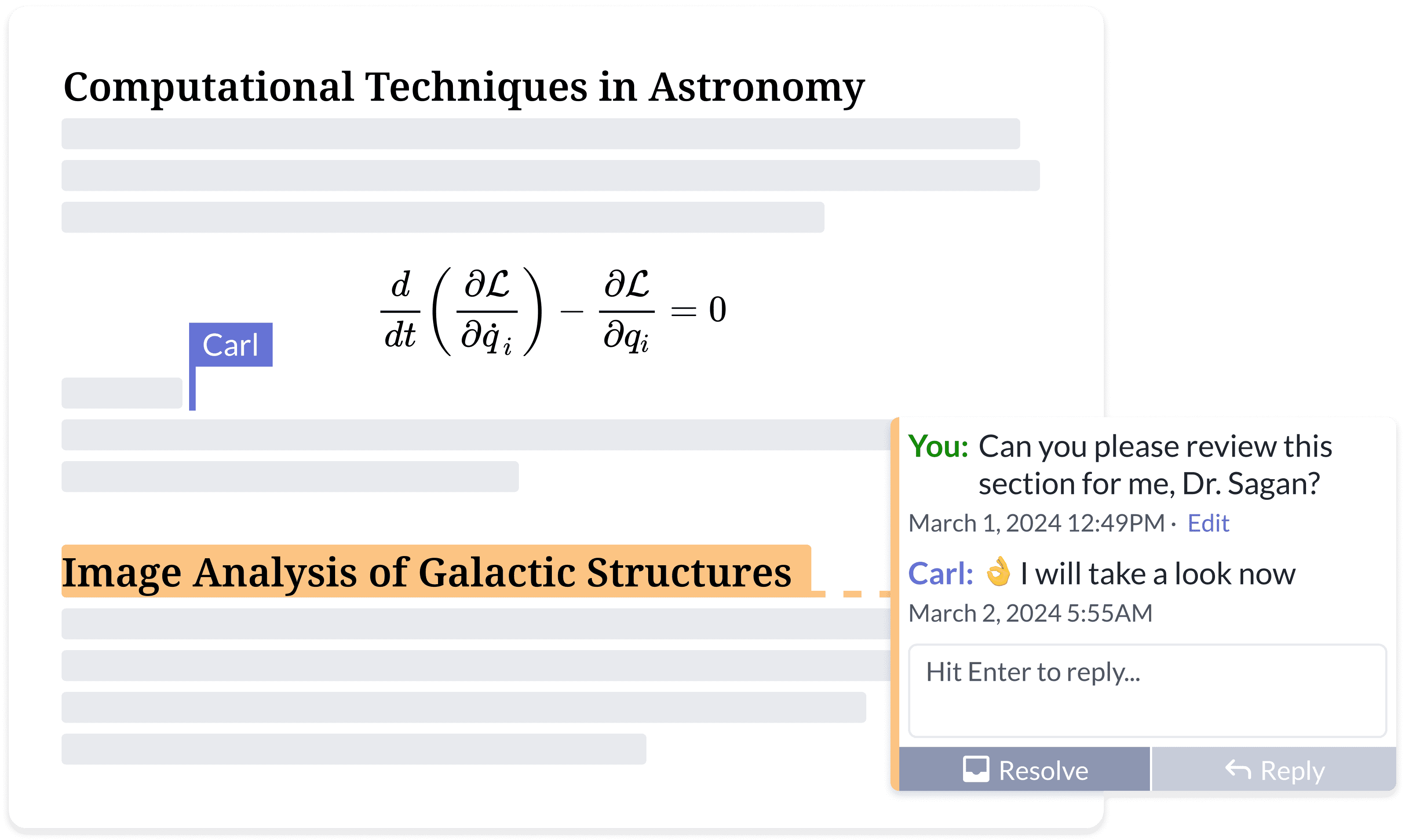
### <i class="fa-people-group">:people-group:</i> 함께 최고의 작업을 작성하세요

끝없는 이메일 피드백의 반복은 이제 그만.

* 어떤 기기에서든 어디서나 접근
* 문서 공유
* 동시 편집 및 댓글 작성
* 실시간 변경 추적
* 프로젝트 기록 및 버전 관리
  {% endcolumn %}

{% column width="50%" %}

<figure><img src="https://cdn.overleaf.com/img/website-redesign/commenting.png" alt=""><figcaption></figcaption></figure>

{% endcolumn %}
{% endcolumns %}

{% columns %}
{% column width="50%" %}

<div align="left" data-with-frame="true"><figure><img src="/files/25d646ab6a094f562c3f7c66e4244a8b073a3752" alt="" width="563"><figcaption></figcaption></figure></div>
{% endcolumn %}

{% column width="50%" %}

### <i class="fa-file-code">:file-code:</i> 커뮤니티가 작성한 overleaf 개발자 문서에 대해 더 읽어보세요.

Overleaf 관련 `개발자` 자료는 온라인에서 많지 않습니다.

여기에서 Overleaf의 아키텍처와 개발자 도구 대부분, 그리고 몇 가지 디버깅 기술도 찾을 수 있습니다.

<p align="right"><a href="/spaces/I2qEfJyb19sFvDmuZcCm" class="button secondary" data-icon="book">개발자 문서</a> </p>
{% endcolumn %}
{% endcolumns %}

{% columns %}
{% column width="50%" %}

### <i class="fa-docker">:docker:</i> $$\TeX$$ @Ayaka-Notes가 빌드한 Docker에서 실행

Overleaf는 <mark style="color:파란색;">**Docker**</mark> 컨테이너를 사용하여 $$\LaTeX$$ 프로젝트를 컴파일합니다. 프로젝트는 격리된 Docker 샌드박스에서 컴파일되어 절대적인 <mark style="color:초록색;">**보안을**</mark>.

따라서, 우리는 $$\TeX$$ 2019년부터 최신까지의 Live 이미지로, 모든 글꼴과 $$\LaTeX$$ 패키지를 포함해 버전 간 자유로운 전환을 지원합니다.

<a href="/spaces/0bsEVRuqHiTwccEZfTnf" class="button secondary" data-icon="docker">TeXLive 전체 이미지</a>&#x20;
{% endcolumn %}

{% column width="50%" %}

<pre class="language-latex" data-title="main.tex" data-line-numbers><code class="lang-latex"><strong>\documentclass{article}
</strong>
\title{멋진 문서}
\author{당신의 이름}
\date{\today}

<strong>\begin{document}
</strong>\maketitle
여기에 내용을 시작하세요...
\section{소개}
여기에 소개를 시작하세요...

<strong>\end{document}
</strong></code></pre>

{% endcolumn %}
{% endcolumns %}

{% hint style="info" %}
Overleaf Pro는 Overleaf, Inc. 또는 모회사인 Digital Science와 제휴하지 않았습니다. 또한 *Server Pro가 아닙니다* 에디션은 Overleaf, Inc.가 제공하는 상업용 제품입니다. Overleaf Pro는 다음이 개발하고 유지보수하는 독립 프로젝트입니다. [ayaka-notes](https://github.com/ayaka-notes).
{% endhint %}


---

# Agent Instructions
This documentation is published with GitBook. GitBook is the documentation platform designed so that both humans and AI agents can read, navigate, and reason over technical content effectively. Learn more at gitbook.com.

## Querying This Documentation
If you need additional information that is not directly available in this page, you can query the documentation dynamically by asking a question.

Perform an HTTP GET request on the current page URL with the `ask` query parameter, and the optional `goal` query parameter:

```
GET https://overleaf-pro.ayaka.space/home/ko/home.md?ask=<question>&goal=<endgoal>
```

`ask` is the immediate question: it should be specific, self-contained, and written in natural language.
`goal` is optional and describes the broader end goal you are ultimately trying to accomplish on behalf of the user. GitBook uses it to tailor the answer towards what is most useful for that goal.

The response will contain a direct answer to the question and relevant excerpts and sources from the documentation.

Use this mechanism when the answer is not explicitly present in the current page, you need clarification or additional context, or you want to retrieve related documentation sections.